From Tax Year 2026-27, TDS/TCS payments must be made under the Income Tax Act, 2025 using the new challan available on the e-Filing portal. The sections have been renumbered — for example, old Section 194C (TDS on contractor payments) is now Section 393(1) [Sl. No. 6(i).D(a)] & 393(1) [Sl. No. 6(i).D(b)]. The portal now allows multiple TDS/TCS sections in a single challan, up to 20 codes, which is a significant change from the earlier one-section-per-challan approach.
What Changed from Tax Year 2026-27?
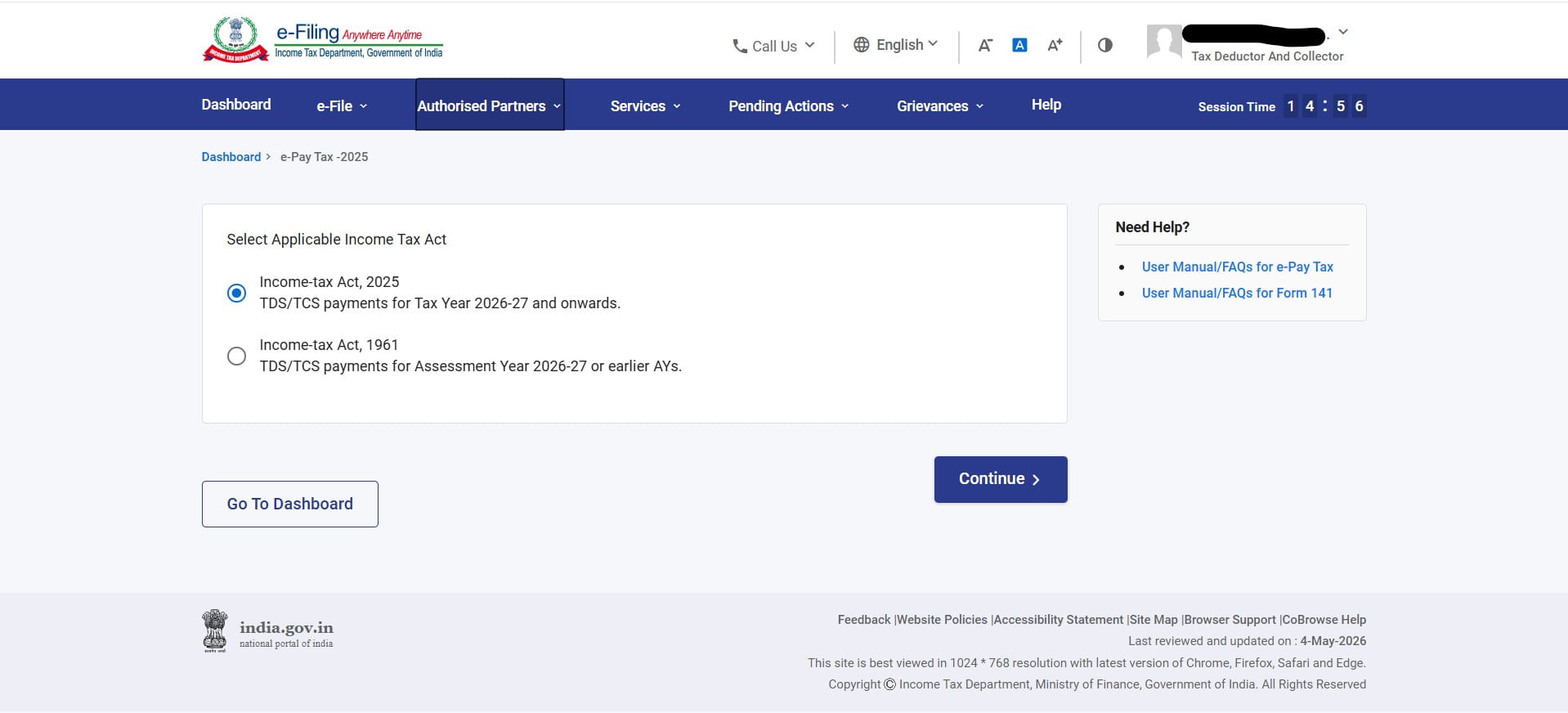
The Income Tax Act, 2025 replaces the Income Tax Act, 1961. All TDS and TCS provisions have been reorganised and renumbered under the new Act. The Income Tax e-Filing portal has been updated to reflect this — when you go to e-Pay Tax, you will now see two options: one for the Income-tax Act, 2025 (Tax Year 2026-27 and onwards) and one for the Income-tax Act, 1961 (AY 2026-27 or earlier).
The key practical changes for deductors are as follows:
Old TDS Payment Process
- Used Challan No. 281 (ITNS 281)
- One section per challan
- Section numbers like 192, 194C, 194I, 194J
- Assessment Year basis
- Separate challans for each nature of payment
New TDS Payment Process
- New challan under ITA 2025 on e-Filing portal
- Up to 20 sections in a single challan
- New section numbers: 392, 393(1), 393(2) etc.
- Tax Year basis (Tax Year 2026-27)
- One challan can cover multiple natures of payment
Step-by-Step: How to Pay TDS/TCS on the Portal
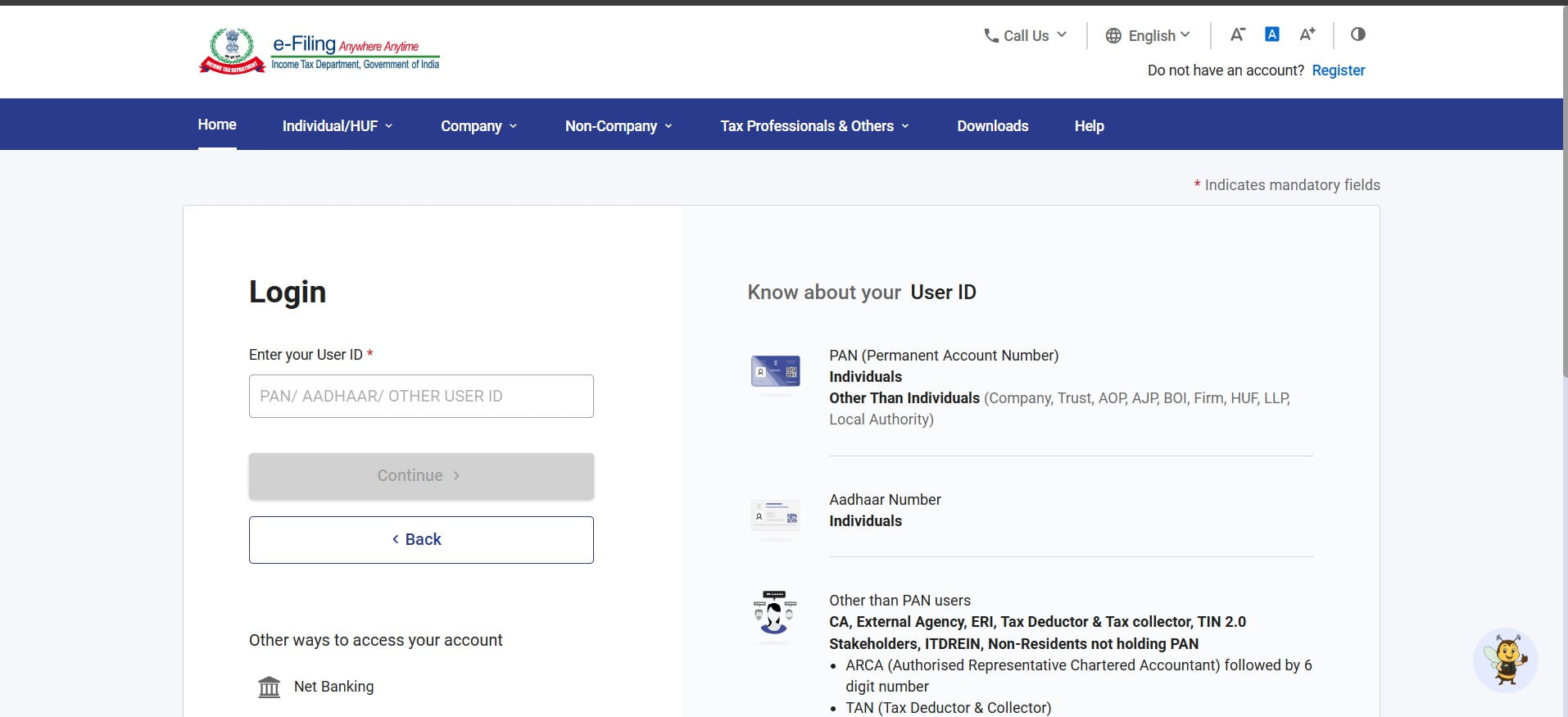
Open your browser and go to eportal.incometax.gov.in. Enter your User ID — this will be your TAN if you are a Tax Deductor or Tax Collector, or your PAN if you are an individual. Enter your password and complete the OTP verification to login.
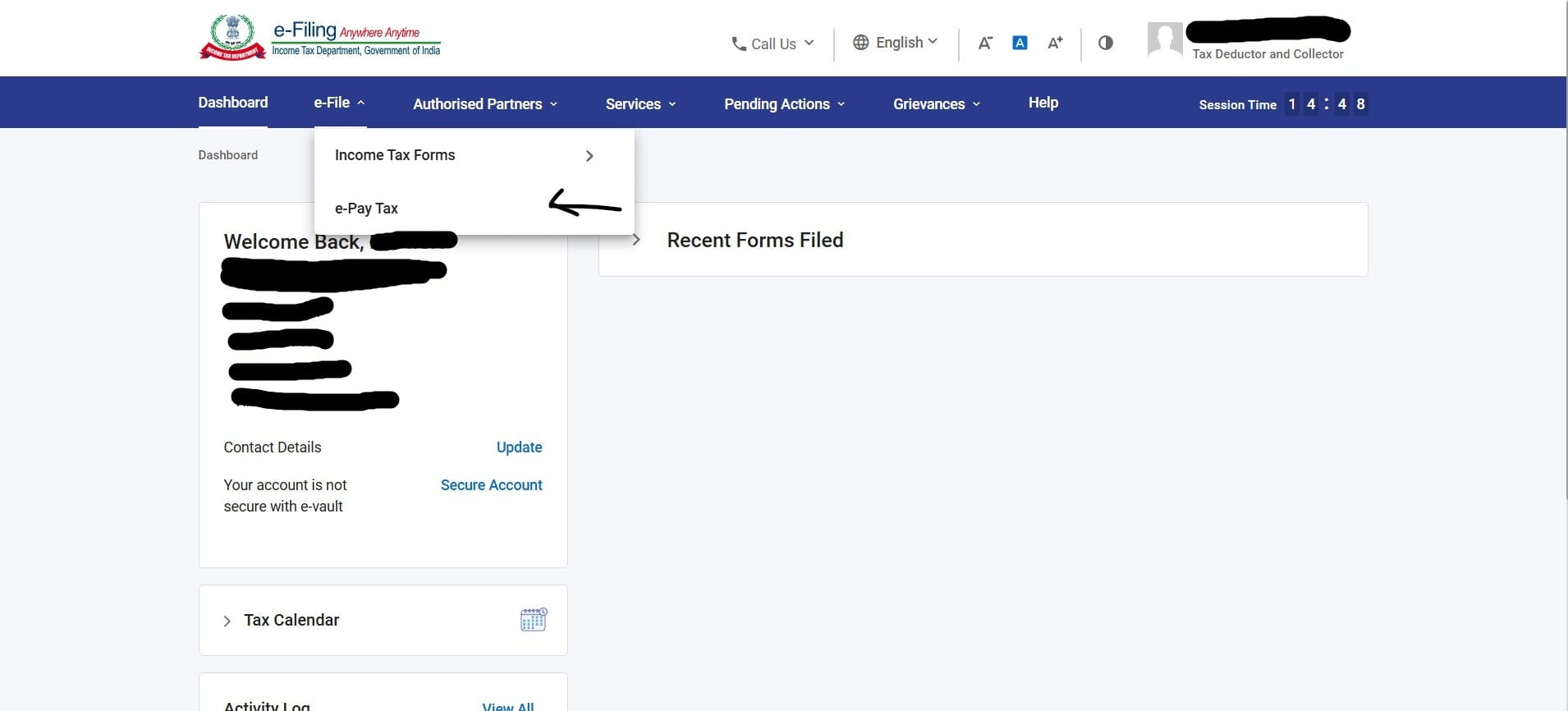
After login, click the e-File menu in the top navigation bar. A dropdown will appear. Click on e-Pay Tax.
The portal will show a screen asking you to Select Applicable Income Tax Act. You will see two options:
Select Income-tax Act, 2025 for all TDS/TCS payments relating to transactions from 1 April 2026 onwards. Click Continue.
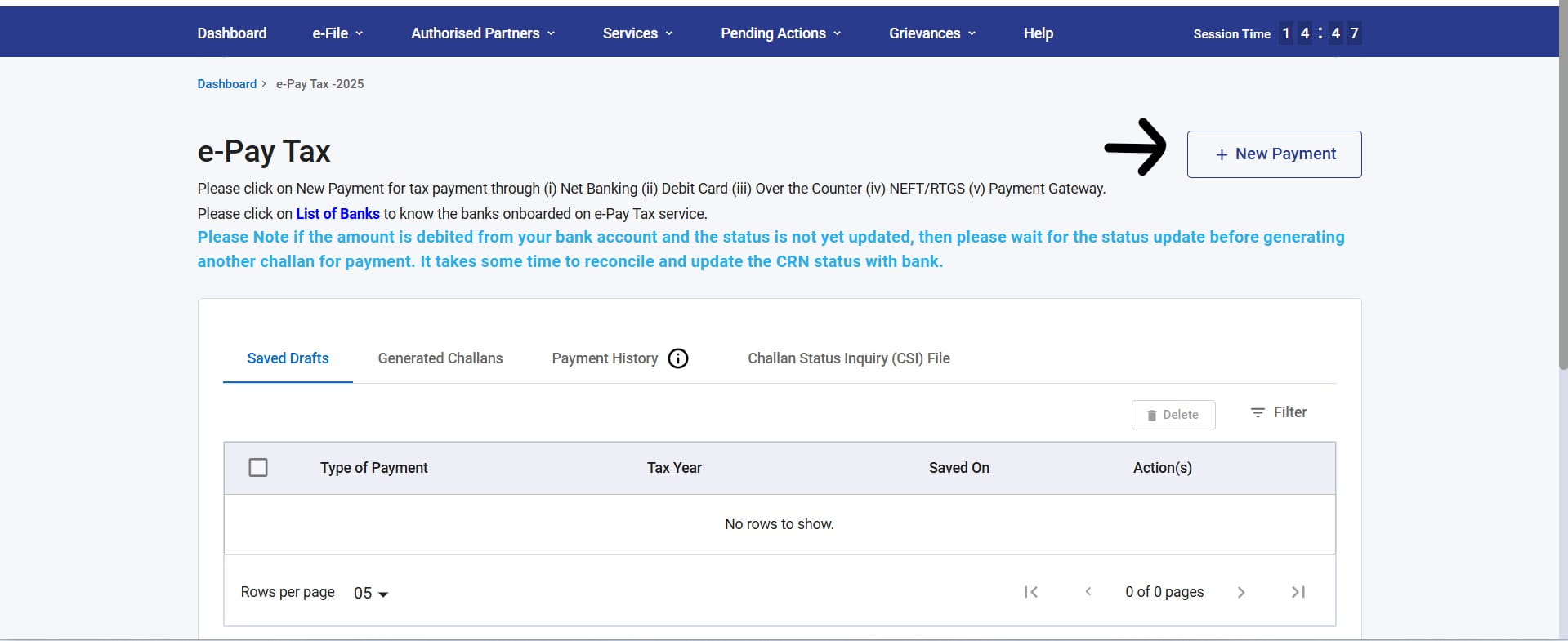
You will land on the e-Pay Tax dashboard showing your Saved Drafts, Generated Challans, Payment History, and Challan Status Inquiry (CSI) File tabs. To initiate a new TDS/TCS payment, click the + New Payment button at the top right.
The New Payment screen will display your TAN and a mandatory Tax Year dropdown. Click the dropdown and select 2026-27. Once selected, the payment categories will become active.
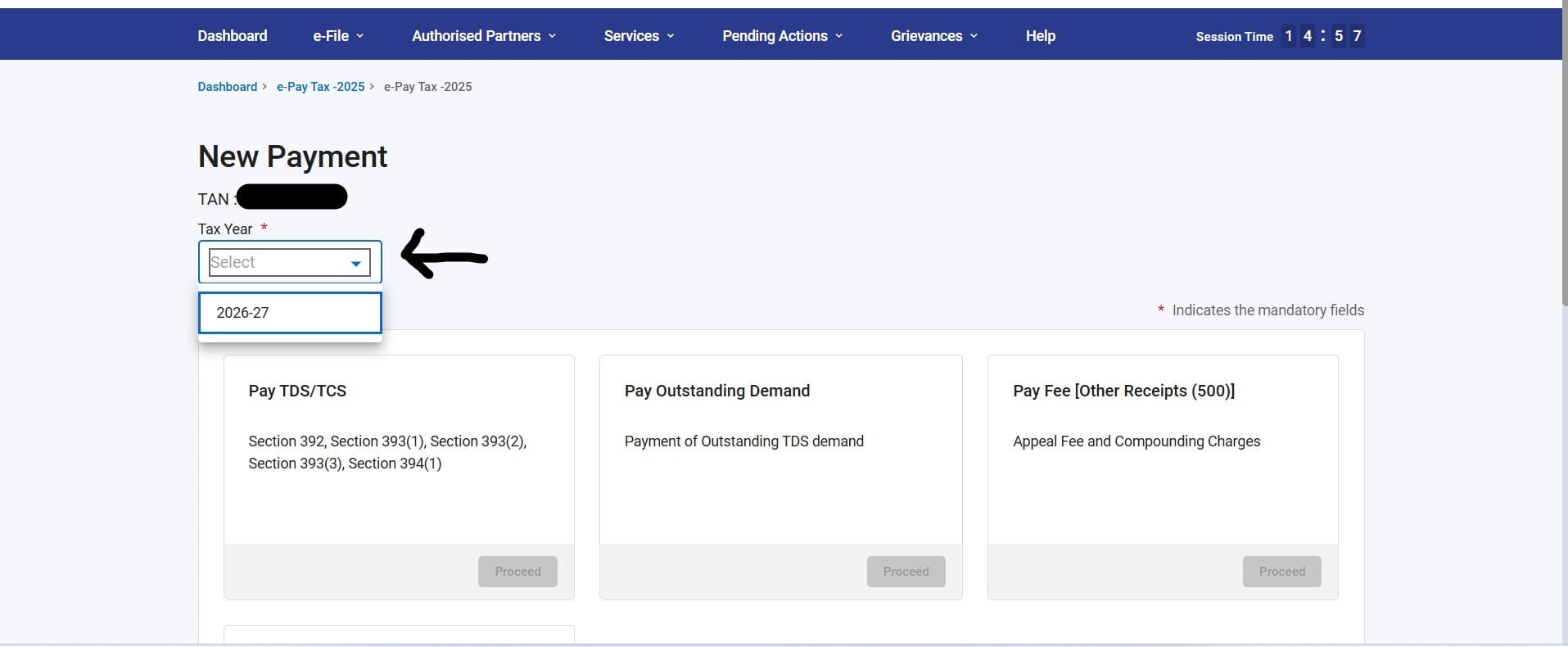
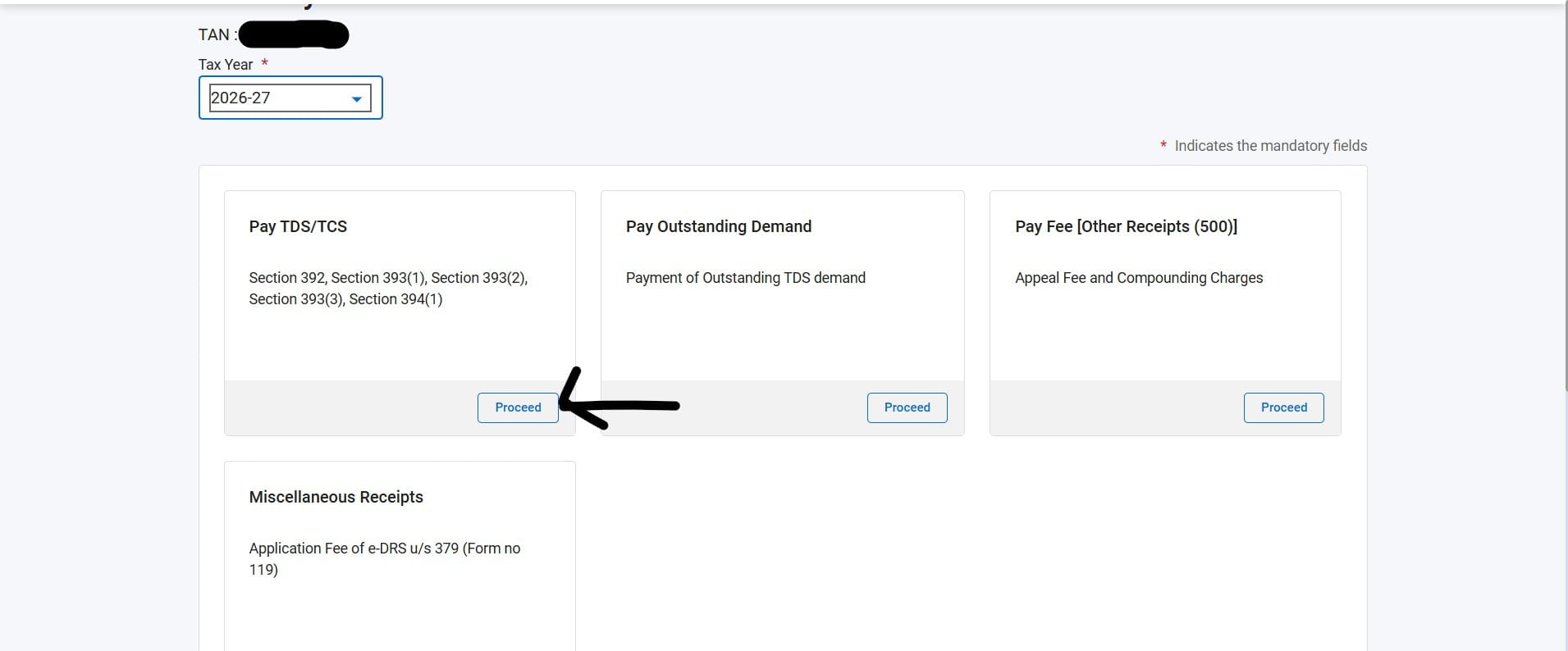
After selecting the Tax Year, four payment category cards become active. For TDS/TCS payments, click the Proceed button under the Pay TDS/TCS card. This card covers Section 392, Section 393(1), Section 393(2), Section 393(3), and Section 394(1) of the Income Tax Act, 2025.
The challan detail screen opens. The Type of Payment (Minor Head) will show TDS/TCS Payable by Taxpayer (200). You need to select two mandatory fields:
Tax Applicable (Major Head)
Residential Status of the Deductee(s)
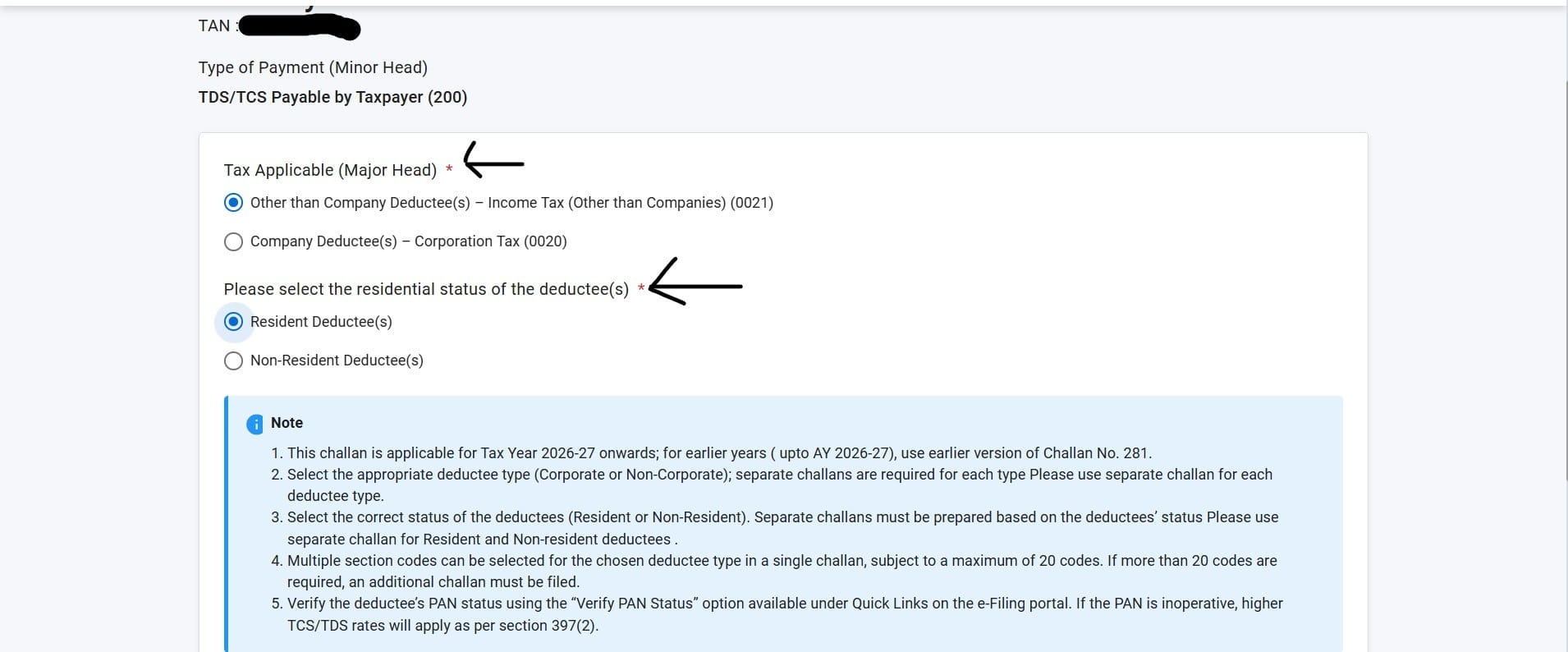
Use separate challans for: (a) Corporate vs Non-Corporate deductees, and (b) Resident vs Non-Resident deductees. One challan cannot mix both types. If you have payments for both company and non-company deductees in the same month, you must file two separate challans.
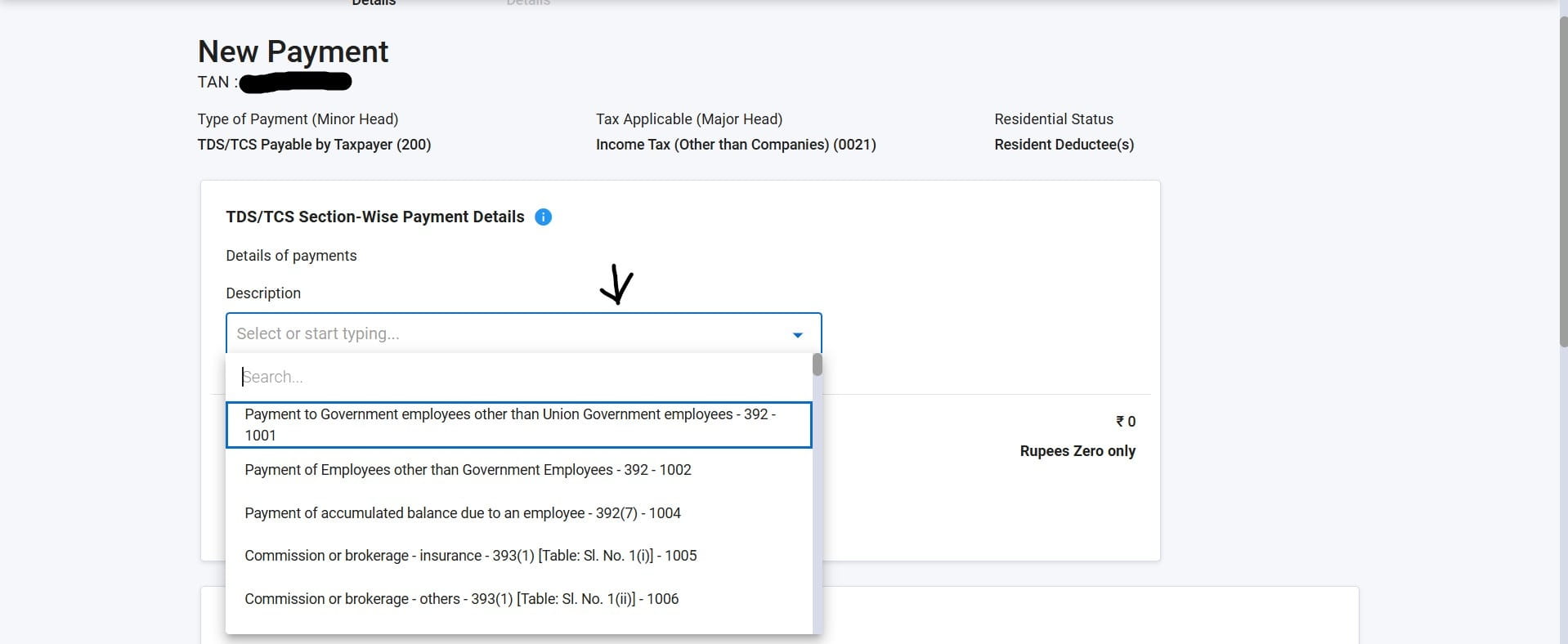
The next section is TDS/TCS Section-Wise Payment Details. Click on the Description dropdown and search for or select the nature of payment. The dropdown shows the new section numbers under ITA 2025 along with payment codes.
Examples visible on the portal:
| Description | New Section (ITA 2025) | Code | Old Section (ITA 1961) |
|---|---|---|---|
| Payment to Govt. employees other than Union Govt. employees | 392 | 1001 | 192 |
| Payment of Employees other than Government Employees | 392 | 1002 | 192 |
| Payment of accumulated balance due to an employee | 392(7) | 1004 | 192A |
| Commission or brokerage — insurance | 393(1) [Table: Sl. No. 1(i)] | 1005 | 194D |
| Commission or brokerage — others | 393(1) [Table: Sl. No. 1(ii)] | 1006 | 194H |
| Rent other than machinery etc. — specified person | 393(1) [Table: Sl. No. 2(ii).D(b)] | 1009 | 194-IB |
The new section numbers under the Income Tax Act, 2025 are different from the familiar sections like 194C, 194J, 194I that deductors have been using for years. To find the correct new section for your payment, use our free TDS/TCS 2026-27 Code Finder Tool.
How to use the tool: Go to cajatinkarda.in/utilities/tds-tcs-2026-27. You can:
- Type the old section number (e.g., 194C, 194I, 194J, 194Q) and the tool will show you the corresponding new ITA 2025 section.
- Type the nature of payment (e.g., "contractor", "rent", "professional fees") and the tool will list all matching sections.
- Browse by keyword to discover the applicable section if you are unsure of the old number.
- The tool shows the old section reference alongside the new section so you can cross-verify.
Once you have the correct new section and its payment code from our tool, use it to select the right option from the Description dropdown on the portal. The dropdown is searchable — you can type the section number (e.g., "393") or the nature (e.g., "contractor") to narrow down the list.
For ease, note the Code number (e.g., 1002, 1005, 1009) from our tool before going to the portal. You can search by code number directly in the portal's Description dropdown to reach the right section instantly.
Before clicking Add or proceeding to payment, cross-verify: (a) Is the section correct for the nature of payment? (b) Is the Major Head (0020/0021) correct for the type of deductee? (c) Is the residential status (Resident/Non-Resident) correctly selected? Errors in these fields result in a mismatched challan which is difficult to correct after payment.
One of the most significant improvements in the new challan under ITA 2025 is the ability to include multiple TDS/TCS sections in a single challan. After adding the first section (clicking the Add button), you can add another nature of payment in the same Description field — up to a maximum of 20 section codes per challan.
The table at the bottom of the payment screen shows all added sections with their Description, Section, Code, and Tax amount. You can edit or delete individual entries before proceeding to payment.
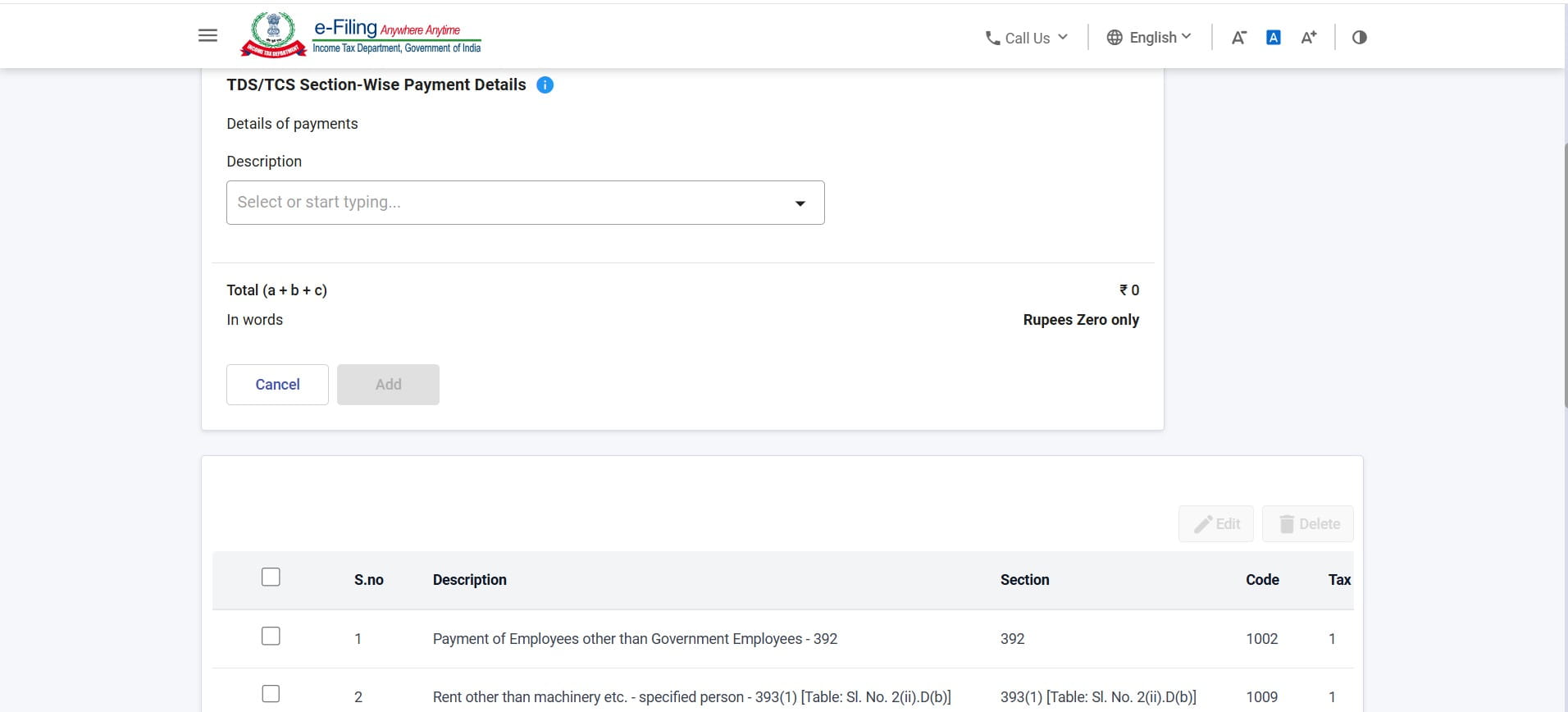
Under the old ITA 1961 regime, a separate Challan 281 was required for each nature of payment. From Tax Year 2026-27, you can pay TDS for salary (Section 392), contractor payments (Section 393(1)), rent (Section 393(1)), professional fees (Section 393(1)), and other natures in a single challan — saving time and reducing the number of challans to track. If you have more than 20 codes, file an additional challan for the remaining codes.
Quick Reference — Old vs New Section Numbers
The following table lists the most commonly used TDS sections and their new equivalents under the Income Tax Act, 2025. For a complete searchable list, use our free TDS/TCS Code Finder Tool.
| Nature of Payment | Old Section (ITA 1961) | New Section (ITA 2025) | Default Rate |
|---|---|---|---|
| Salary to employees | 192 | 392 | As per slab |
| Accumulated PF balance to employee | 192A | 392(7) | 10% |
| Interest on securities | 193 | 393(1) [Sl. No. 5(i)] | 10% |
| Dividend | 194 | 393(1) [Sl. No. 7] | 10% |
| Interest other than interest on securities | 194A | 393(1) [Sl. No. 5(ii).D(b)] | 10% |
| Lottery / crossword puzzle winnings | 194B | 393(3) [Sl. No. 1] | 30% |
| Payment to contractors | 194C | 393(1) [Sl. No. 6(i).D(a)] | 1% / 2% |
| Insurance commission | 194D | 393(1) [Sl. No. 1(i)] | 2% / 10% |
| Payment to non-resident sportsman | 194E | 393(2) [Sl. No. 1] | 20% |
| Commission or brokerage | 194H | 393(1) [Sl. No. 1(ii)] | 2% |
| Rent on land, building, furniture | 194-I(a)/(b) | 393(1) [Sl. No. 2(ii).D(a)] | 2% / 10% |
| Rent by individual/HUF (specified person) | 194-IB | 393(1) [Sl. No. 2(i)] | 2% |
| Transfer of immovable property | 194-IA | 393(1) [Sl. No. 3(i)] | 1% |
| Professional / technical fees | 194J | 393(1) [Sl. No. 6(iii).D(b)] | 10% / 2% |
| TDS on purchase of goods | 194Q | 393(1) [Sl. No. 8(ii)] | 0.1% |
| TCS on foreign remittance (LRS) | 206C(1G) | 394(1) Table — LRS item | 2% / 20% |
* This is a reference list. Rates may vary based on deductee status, PAN validity, and threshold conditions. Use our TDS/TCS Code Finder Tool for the complete list with all codes.
- Use Income-tax Act, 2025 for all TDS/TCS on transactions from 1 April 2026 onwards (Tax Year 2026-27)
- Use Challan No. 281 (ITA 1961) for TDS/TCS relating to transactions up to 31 March 2026
- Major Head 0020 (Corporation Tax) for company deductees; 0021 (Income Tax Other than Companies) for all others
- Use separate challans for corporate and non-corporate deductees, and for resident and non-resident deductees
- Up to 20 TDS/TCS section codes can be included in a single challan from Tax Year 2026-27
- If the deductee's PAN is inoperative, higher TDS/TCS rates apply as per Section 397(2) of ITA 2025 — verify PAN status before payment
- Use our free TDS/TCS Code Finder Tool to map old section numbers (194C, 194J etc.) to new ITA 2025 sections before filling the challan

Need Help with TDS/TCS Compliance?
From challan preparation to TDS return filing (Form 24Q, 26Q, 27Q), our team handles end-to-end TDS/TCS compliance under the Income Tax Act, 2025. Reach out for a free consultation.
Book a Free Consultation →